Version 9.6.18 of the documentation is not the most recent version. For up-to-date documentation, see the latest version.
Bearer Authentication
2 minute read
This authentication method uses Keycloak as its Identity Provider and an access token retrieved from Keycloak to authenticate to the server. For this authentication method, the Authentication header must use the Bearer authentication scheme name as defined in RFC-6750, followed by an access token string.
It is the responsibility of the requesting application to obtain a valid access token string from Keycloak.
Keycloak: Granting a user access to the ECC REST API
In Keycloak, the API user must have the “HighLevelAvailable” role enabled to access the ECC REST API. Several roles are optional for API users. The following table displays both required and optional roles.
| Keycloak Role (Permission) Name | Description | Required? |
|---|---|---|
| HighLevelAvailable | Grants access to the REST API | Yes |
| CreateCollections | Grants permission to user to create new collections | No |
| ManageConfigurations | Grants permission to the user to manage templates and configurations | No |
| ManageJobs | Grants permission to the user to manage existing jobs | No |
Keycloak: POST request for access token
One way to request an access token from a Keycloak server is to make an HTTPS POST request with specific x-www.form-urlencoded key value pairs in the request body. This section includes both an example of the endpoint and a table of the key value pairs required in the request body.
POST request example endpoint
POST {base-url}/auth/realms/{realm}/protocol/openid-connect/token
Note: To use this example, you must replace {base-url} with the HTTPS URL of your Keycloak server and {realm} with the name of the realm you configured in Keycloack.
Key Value pairs for POST request body
The following key value pairs must be included in the request body.
| Key | Value |
|---|---|
| grant_type | password (the string “password” itself as a hard-coded value) |
| client_id | The name of the client, in this case: “ECC” |
| client_secret | The value of the authorization.server.secretId from the ECC server.conf file normally found at C:\Program Files\Nuix-ECC\Main\server.conf and which was generated and copied from Keycloak > Clients > ECC > Credentials > Secret |
| username | The username of the user used to authenticate via Keycloak who wants to access the ECC REST API |
| password | The password of the user to authenticate via Keycloak who wants access to the ECC REST API |
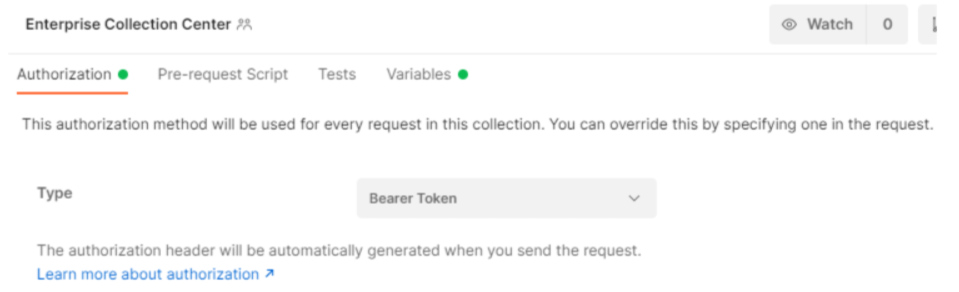
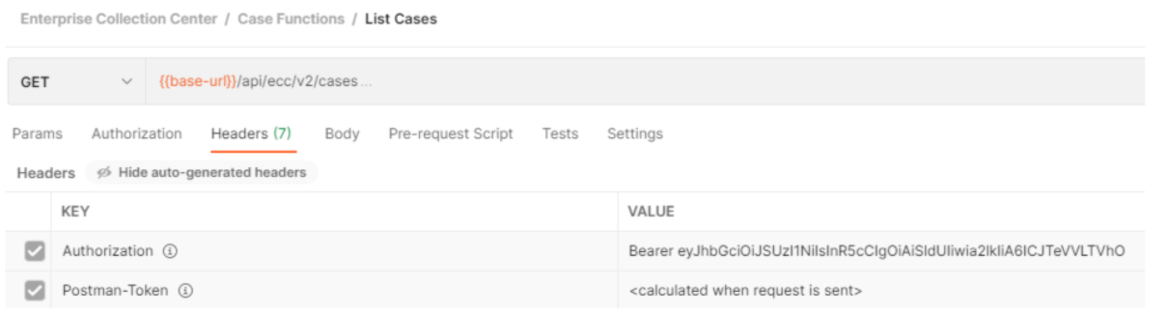
Examples of using Bearer Tokens in Postman
Using Postman to set the Authorization type to Bearer Token for ECC Rest API calls
An example ECC Rest API Call using Postman Bearer token in Headers
Feedback
Was this page helpful?
Thank you for your feedback.
Thank you for your feedback.