Version 9.6.18 of the documentation is not the most recent version. For up-to-date documentation, see the latest version.
Basic Authentication
2 minute read
The authentication uses a username – password pair. In this authentication method, the Authentication header must use the ‘Basic’ authentication scheme name as defined in RFC-7617, followed by a Base64 encoded user-id:password string.
Example: Authentication: Basic Base64Encoding (Joe:123456)
To use this authentication method, you must first create a role for the REST API user, then create an ECC user for the REST API.
Create a role for the REST API user
-
In the Administration Console menu, select Users and Roles.
-
In the Roles section of the dialogue, click on the New Role icon. In the Roles dialog,
-
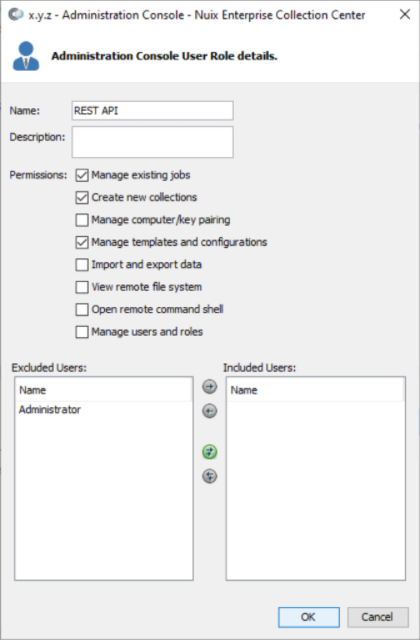
Enter a name for the new Role and check the following permissions:
-
Manage existing jobs
-
Create new collections
-
Manage templates and configurations
-
-
Click OK.
Create an ECC user for the REST API
-
In the Administration Console menu, select Users and Roles.
-
In the Users section of the dialogue, click on the New User icon.
-
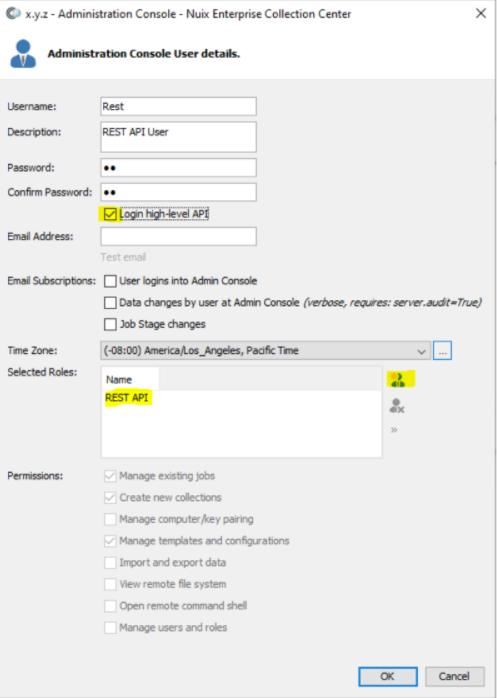
Enter a Username and Password.
Important: Be sure to select the Login high-level API checkbox, or the user will not have access to the REST API.
-
In the Selected Roles section, add the Role that was created in the steps above.
-
Click OK.
The REST API is now enabled, and the username and password entered for this new user will be used in all REST calls.
Feedback
Was this page helpful?
Thank you for your feedback.
Thank you for your feedback.