Version 9.8.10 of the documentation is not the most recent version. For up-to-date documentation, see the latest version.
Bearer Authentication
2 minute read
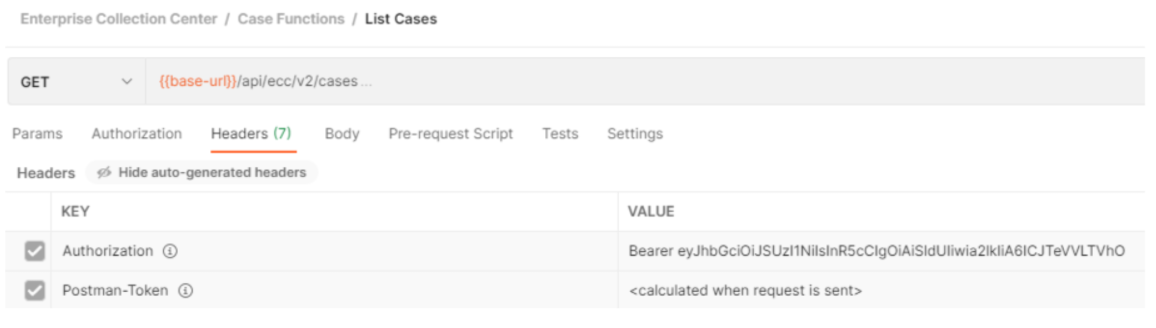
This authentication method uses Keycloak as its Identity Provider — and an access token retrieved from Keycloak — to authenticate to the server. For this authentication method, the Authentication header must use the Bearer authentication scheme name as defined in RFC-6750, followed by an access token string.
Example: Authentication: Bearer {access token string}
Note: It is the responsibility of the requesting application to obtain a valid access token string from Keycloak.
Keycloak: Granting a user access to the ECC REST API
In Keycloak, within the Client named ECC, each ECC REST API user must be assigned the Role named HighLevelAvailable. Each ECC REST API user may also require additional Roles depending on the REST commands they need to execute; see the following table:
| Keycloak Role (Permission) Name | Description | Required? |
|---|---|---|
HighLevelAvailable |
Grants access to the REST API | Yes |
CreateCollections |
Grants permission to user to create new collections | No |
ManageConfigurations |
Grants permission to the user to manage templates and configurations | No |
ManageJobs |
Grants permission to the user to manage existing jobs | No |
Keycloak: POST request for access token
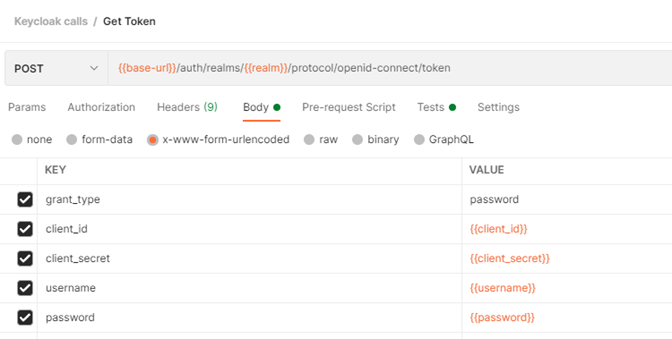
One way to request an access token from a Keycloak server is to make an HTTPS POST request to the url:
{base-url}/auth/realms/{realm}/protocol/openid-connect/token
as follows:
- Replace
{base-url}with the actual HTTPS URL for the Keycloak server - Replace
{realm}with the name of the realm configured in Keycloak - Specify the following
x-www-form-urlencodedkey-value pairs in the request body:
| Key | Value |
|---|---|
grant_type |
password (the string password itself as a hard-coded value) |
client_id |
The name of the client, in this case: “ECC” |
client_secret |
The value of the authorization.server.secretId from the ECC Server’s server.conf file normally found at C:\Program Files\Nuix-ECC\Main\server.conf and which was generated and copied from Keycloak > Clients > ECC > Credentials > Secret |
username |
The username of the user used to authenticate via Keycloak who wants to access the ECC REST API |
password |
The password of the user to authenticate via Keycloak who wants access to the ECC REST API |
Note: The HTTP header Content-Type may need to be set to application/x-www-form-urlencoded
Examples of using Bearer Tokens in Postman
Example request using Postman to obtain an access token (a JWT token) from a Keycloak server:
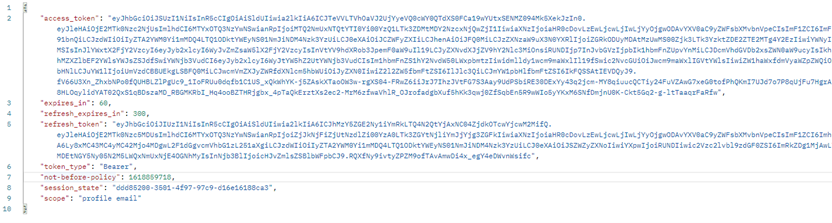
Example JSON response after requesting a JWT access_token from a Keycloak server:
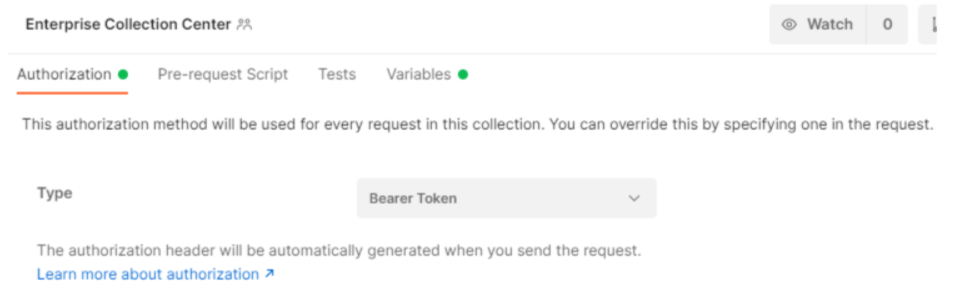
Using Postman to set the Authorization type to Bearer Token for ECC Rest API calls
An example ECC Rest API Call using Postman Bearer token in Headers
Feedback
Was this page helpful?
Thank you for your feedback.
Thank you for your feedback.